> For the complete documentation index, see [llms.txt](https://black-horizon-studios.gitbook.io/emerald-ai-wiki/llms.txt). Markdown versions of documentation pages are available by appending `.md` to page URLs; this page is available as [Markdown](https://black-horizon-studios.gitbook.io/emerald-ai-wiki/emerald-profiles-and-objects/sound-profile.md).

# Sound Profile

<figure><img src="/files/WLhBcj8dQZ827SpSEn9v" alt=""><figcaption></figcaption></figure>

## Using the Sounds Profile

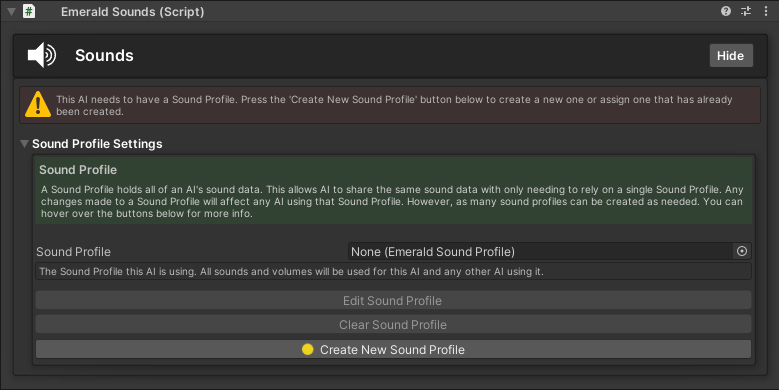
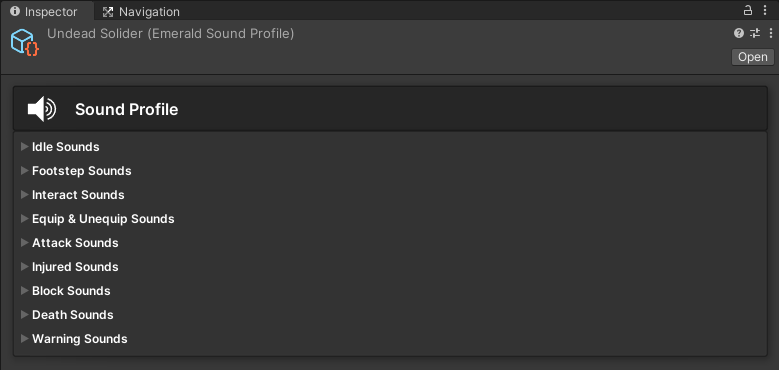
A Sound Profile holds all of an AI's sound data. This allows AI the option to share the same sound data with only needing to rely on a single Sound Profile. Any changes made to a Sound Profile will affect any AI using that Sound Profile. However, as many sound profiles can be created as needed.&#x20;

{% hint style="warning" %}
**Important:** Some sounds require an Animation Event to be played. These are covered in the tutorial sections below .
{% endhint %}

{% hint style="success" %}
Here are the available tutorials and guides for the Sound Profile.
{% endhint %}

<table data-view="cards"><thead><tr><th></th><th></th><th></th><th data-hidden data-card-cover data-type="files"></th><th data-hidden data-card-target data-type="content-ref"></th></tr></thead><tbody><tr><td></td><td><p>       Creating an AI's </p><p>         Sound Profile</p></td><td></td><td><a href="/files/un8XsAcNmCs0PMausRVr">/files/un8XsAcNmCs0PMausRVr</a></td><td><a href="/pages/4dqjUC00nynsqGwQQ3sQ">/pages/4dqjUC00nynsqGwQQ3sQ</a></td></tr><tr><td></td><td><p>             Setting Up </p><p>        Footstep Sounds</p></td><td></td><td><a href="/files/WLhBcj8dQZ827SpSEn9v">/files/WLhBcj8dQZ827SpSEn9v</a></td><td><a href="/pages/amWtee4b2lkKxWNQnsdM">/pages/amWtee4b2lkKxWNQnsdM</a></td></tr><tr><td></td><td><p>             Setting Up </p><p>          Attack Sounds</p></td><td></td><td><a href="/files/WLhBcj8dQZ827SpSEn9v">/files/WLhBcj8dQZ827SpSEn9v</a></td><td><a href="/pages/c4zlN2mOObP3r0HA8Usv">/pages/c4zlN2mOObP3r0HA8Usv</a></td></tr><tr><td></td><td><p>             Setting Up </p><p>        Warning Sounds</p></td><td></td><td><a href="/files/WLhBcj8dQZ827SpSEn9v">/files/WLhBcj8dQZ827SpSEn9v</a></td><td><a href="/pages/BGQbjfqVQlItBv6qQ0Oy">/pages/BGQbjfqVQlItBv6qQ0Oy</a></td></tr><tr><td></td><td><p>           Setting Up </p><p>        Death Sounds</p></td><td></td><td><a href="/files/WLhBcj8dQZ827SpSEn9v">/files/WLhBcj8dQZ827SpSEn9v</a></td><td><a href="/pages/ojpkxZS1di7BwV46IHAC">/pages/ojpkxZS1di7BwV46IHAC</a></td></tr></tbody></table>


---

# Agent Instructions
This documentation is published with GitBook. GitBook is the documentation platform designed so that both humans and AI agents can read, navigate, and reason over technical content effectively. Learn more at gitbook.com.

## Querying This Documentation
If you need additional information that is not directly available in this page, you can query the documentation dynamically by asking a question.

Perform an HTTP GET request on the current page URL with the `ask` query parameter, and the optional `goal` query parameter:

```
GET https://black-horizon-studios.gitbook.io/emerald-ai-wiki/emerald-profiles-and-objects/sound-profile.md?ask=<question>&goal=<endgoal>
```

`ask` is the immediate question: it should be specific, self-contained, and written in natural language.
`goal` is optional and describes the broader end goal you are ultimately trying to accomplish on behalf of the user. GitBook uses it to tailor the answer towards what is most useful for that goal.

The response will contain a direct answer to the question and relevant excerpts and sources from the documentation.

Use this mechanism when the answer is not explicitly present in the current page, you need clarification or additional context, or you want to retrieve related documentation sections.