# Setup Manager

<figure><img src="https://content.gitbook.com/content/v03IiZPaMe8fX49a9MnO/blobs/RhejgzysYiibrRHo0Pd4/SetupManager.png" alt="" width="563"><figcaption></figcaption></figure>

## Using the Setup Manager

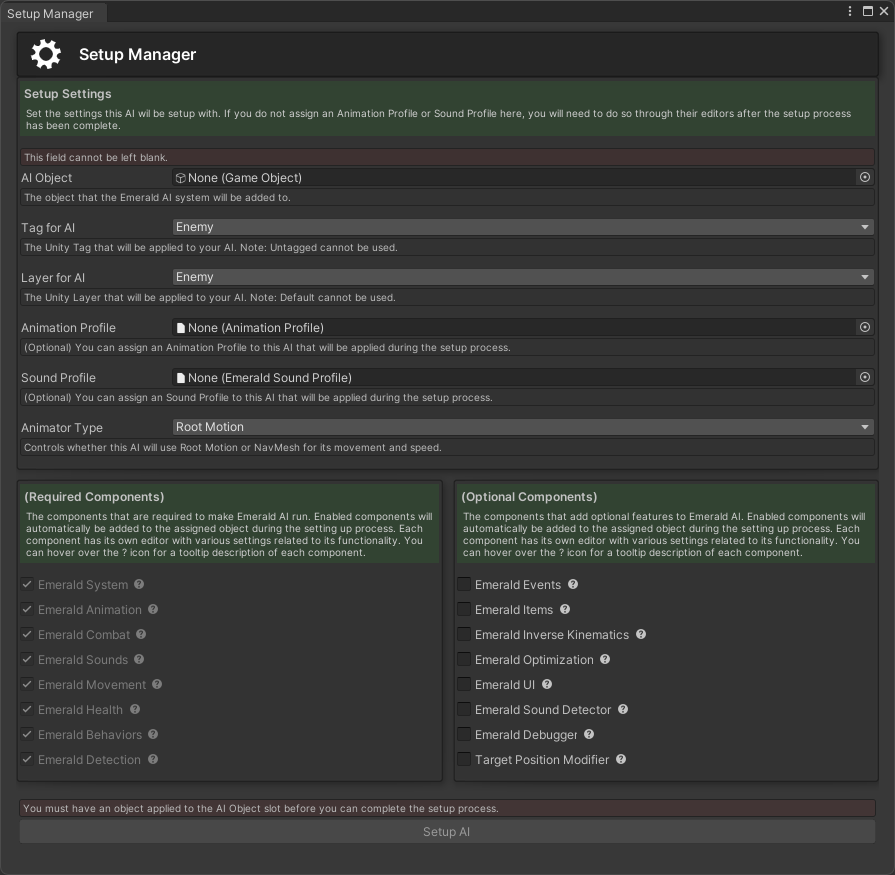
The Setup Manager allows users to easily set up an AI on the desired GameObject by automatically applying all required components. There's also a list of optional components that can be selected that will add additional features and mechanics. The set up process will be finalized after the user has pressed the Setup AI button. You can open the Setup Manager by going to Window>Emerald AI>Setup Manager or by pressing ctrl+shift+e within Unity.

{% hint style="success" %}
Here are the available tutorials and guides for the Setup Manager.
{% endhint %}
<table data-view="cards"><thead><tr><th></th><th></th><th></th><th data-hidden data-card-target data-type="content-ref"></th><th data-hidden data-card-cover data-type="files"></th></tr></thead><tbody><tr><td></td><td><p>    Setting up an AI with </p><p>     the Setup Manager</p></td><td></td><td><a href="setup-manager/setting-up-an-ai-with-the-setup-manager">setting-up-an-ai-with-the-setup-manager</a></td><td><a href="https://content.gitbook.com/content/v03IiZPaMe8fX49a9MnO/blobs/RhejgzysYiibrRHo0Pd4/SetupManager.png">SetupManager.png</a></td></tr></tbody></table>
